Watercolour Photoshop Brushes and 104 Bonus Files
There’s a distinct quality that separates digital work that feels sterile from work that feels crafted. Often, it comes down to texture. In a world saturated with crisp vector lines and perfect gradients, the organic bleed of watercolour offers a refreshing visual break. If you are looking to bridge the gap between digital precision and hand-made warmth, the Watercolour Photoshop Brushes and 104 Bonus Files pack is a versatile addition to your design toolkit.
This collection isn't just about splashing paint onto a canvas; it is a structured set of assets designed for typography and branding. At the core of the pack is a full ABR brush file containing the entire alphabet. These aren't your standard hard-edged stamps. Each letter is rendered to mimic the fluidity of real paint, featuring the natural variations in opacity and texture that occur when a brush meets paper. Because the brushes are kept under 2500 pixels, they maintain excellent compatibility, functioning smoothly in Photoshop CS2 and even PS 7.0. This makes them a reliable choice for designers working on older machines or legacy software versions.
The Visual Personality: Organic, Artisanal, and Approachable
The appeal of these brushes lies in their imperfection. While modern typography often prioritizes geometric precision, these brushes embrace the "happy accidents" of art. The strokes have a dry brush edge or a wet bleed effect depending on how you apply them, giving your text a handpainted touch that feels intimate and human. This style of typography falls somewhere between a script font and a handwritten font, offering the legibility of block letters with the soul of a painting.
This visual personality is incredibly effective for projects that need to build trust or evoke nostalgia. For example, if you are designing a logo for a local bakery, an artisanal soap company, or a boutique coffee roaster, the watercolour aesthetic immediately communicates quality and care. It tells the audience that there is a human behind the brand, rather than just an algorithm. The texture softens the visual hierarchy of a layout, making it feel less corporate and more conversational.
Practical Applications: From Branding to Scrapbooking
The versatility of the Watercolour Photoshop Brushes and 104 Bonus Files extends across various mediums. Because the pack includes 104 PNG bonus files, you have the flexibility to work outside of Photoshop as well. The PNGs are provided at 300 DPI, which is the industry standard for print quality. This means you can confidently use them for high-resolution output without worrying about pixelation.
Here are a few practical ways to integrate these assets into your workflow:
- Editorial and Publishing Design: Use the brushes to create eye-catching drop caps or chapter headers in magazines, cookbooks, or e-books. The organic texture draws the reader's eye without the harshness of a bold sans serif font.
- Social Media Graphics: On platforms like Instagram, standing out is key. The watercolour text creates a tactile feel that stops the scroll. It works exceptionally well for quotes, announcements, or sale graphics where you want a friendly, creative font style.
- Packaging and Stationery: For packaging design, specifically in the stationery sector, these brushes allow you to create custom headers for wedding invitations, greeting cards, or planner stickers. The "Blues" palette included in the bonus set is particularly useful for nautical themes, baby showers, or corporate wellness branding.
- Scrapbooking and Hobbyist Projects: If you are a crafter, the PNG files are drag-and-drop ready. You can layer them over photos in Canva or Procreate to create digital layouts that look like physical paper crafts.
The "Blues" Palette and Bonus Files
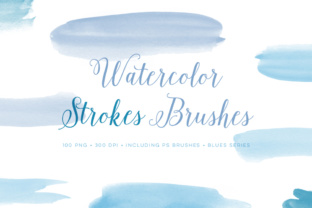
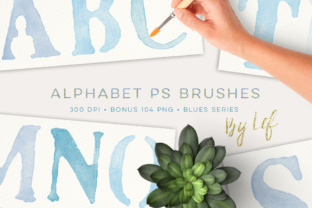
One of the standout features of this collection is the inclusion of the 104 PNG bonus set. While the ABR file allows you to paint with any color you choose, the PNGs come pre-colored in a cohesive "Blues" palette. This is a massive time-saver for designers who struggle with color theory or simply need a quick solution that looks polished.
The blue tones range from deep indigos to soft sky blues, offering enough contrast to create visual hierarchy within your text. This palette works harmoniously with a wide range of design assets. If you are building a brand identity that relies on trust, calm, and professionalism—think wellness brands, educational content, or tech startups—the blue watercolour texture provides a unique way to soften your message. You can find matching graphics and brushes in the shop to expand this system further, ensuring your font pairing and textures remain consistent across all touchpoints.
Technical Considerations and Workflow Integration
When working with watercolour textures, the design assets you choose must be high resolution to maintain realism. The included brushes are around 1000 pixels tall at 300 DPI, which is ideal for standard print projects like A4 flyers or US Letter sized documents. For larger format printing, such as posters or banners, you may need to scale up, but the texture usually holds up better than vector art when enlarged, as the organic noise hides minor pixelation.
From a web design perspective, remember to export your final creations as optimized PNGs or SVGs (if vectorized) to keep page load times down. However, for social media graphics, the high fidelity of the 300 DPI files ensures your images look crisp on retina displays and mobile screens.
If you are pairing these watercolour letters with body copy, consider using a clean serif font or a geometric sans serif font. The contrast between the structured, readable body text and the expressive, artistic headers creates a balanced layout. Avoid pairing the watercolour text with another script font or overly decorative typeface, as this can lead to visual clutter and reduce readability.
Choosing the Right Tool for Your Project
Deciding whether to use a premium font file or a brush set like this depends on the specific needs of your project. A standard font is static; it looks the same every time you type a letter. Brushes, however, allow for dynamic composition. You can rotate letters, overlap them, change the opacity of specific strokes, and even erase parts of the letter to make it look like it's interacting with an object in a photo.
This level of customization is what elevates a design from "template-based" to "custom artwork." It is particularly useful for logo design, where uniqueness is paramount. By using the Watercolour Photoshop Brushes and 104 Bonus Files, you can create a logo that no one else can replicate simply by typing it out. You are essentially hand-lettering digitally.
For entrepreneurs and small business owners, this asset offers a way to create commercial font style graphics without hiring a hand-lettering artist for every single social post. It empowers you to maintain a consistent brand identity