Unleash Whimsical Watercolour with Procreate Bleed Brushes
The Digital Craft Revolution at Your Fingertips
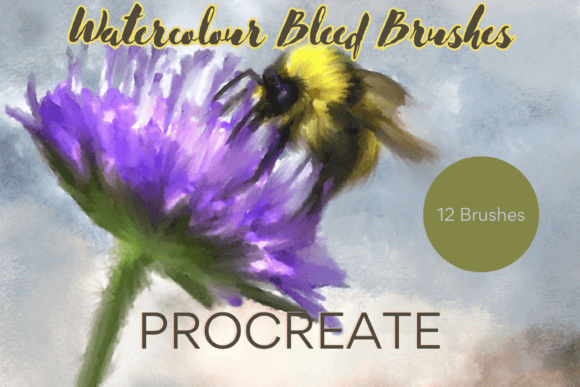
There’s a certain magic to traditional watercolour—the way pigment bleeds into wet paper, creating soft edges and unpredictable blooms. For years, achieving that authentic, organic look digitally was a frustrating exercise in fudge and approximation. Generic software brushes often felt sterile, missing the subtle imperfections that give watercolour its soul. This is precisely the problem the Procreate Watercolour Bleed Brushes X12 set out to solve. They are not just a collection of digital tools; they are a bridge to genuine artistic expression on your iPad, capturing the fluid, responsive behaviour of real paint.
Imagine you’re designing a series of greeting cards for your small business. You need a background that feels handmade, warm, and inviting, but you don’t have the time or space for a full paint setup. With these brushes, you can lay down a wash of colour, watch it spread with a natural bleed, add a drip stamp for authenticity, and have a professional, print-ready asset in minutes. This is the core appeal: professional results without the professional studio cleanup. The brushes are pressure-sensitive and responsive to the Apple Pencil, meaning the harder you press, the more pigment and bleed you get, just like with a real brush.
More Than a Tool: A Style and Personality
Every design asset carries a personality, and the Procreate Watercolour Bleed Brushes X12 are no exception. Their visual character is distinctly whimsical, organic, and handcrafted. They excel at creating soft, dreamy illustrations, elegant florals, and textured backgrounds that feel alive. The style avoids the harsh, vector-perfect lines of modern digital design, instead embracing a softer, more approachable aesthetic. This makes them a powerful creative font—not in the typographic sense, but as a foundational design asset that defines the tone of your entire project.
This personality directly influences brand perception and audience engagement. A brand using these textures in its social media graphics or packaging design communicates creativity, authenticity, and a hands-on approach. For a baker, a florist, a children’s author, or a wellness coach, this watercolour style builds an immediate emotional connection. It tells a story of care and artistry before a single word is read. The visual hierarchy it creates is gentle yet effective, guiding the eye with washes of colour and subtle texture rather than stark, bold lines.
Practical Applications: From Screen to Shelf
The true value of any design asset lies in its versatility. The Procreate Watercolour Bleed Brushes X12 are engineered for a wide spectrum of projects, blurring the lines between digital and physical craft. Here’s where they truly shine:
- Print-on-Demand & Commercial Goods: Create unique, non-repeating patterns for wrapping paper, tote bags, or notebook covers. The brushes are commercial font assets in spirit, allowing you to produce and sell finished goods.
- Brand Identity & Logo Design: Use a single, beautiful watercolour bloom as a background element for a logo, or create textured wordmarks. Pair them with a clean sans serif font for a stunning contrast that balances whimsy with professionalism.
- Editorial & Web Design: Design unique blog post headers, chapter illustrations for a digital book, or textured backgrounds for a website. They add depth and visual interest that static images often lack.
- Greetings & Invitations: This is their sweet spot. Design wedding invitations, birthday cards, or holiday greetings that look and feel like they were painted by hand, adding immense personal value.
Integrating These Brushes into Your Creative Workflow
Getting started is straightforward, but success lies in the details. First, ensure you have the required hardware: an iPad Pro with an Apple Pencil and the Procreate app. The brushes are a premium font equivalent for digital painting—they are high-fidelity tools that demand capable hardware to perform as intended.
When you download the file, you’ll need to unzip it using an app like iZip. Once imported into Procreate, you’ll find the brushes in your library. Here are a few practical tips for evaluation and use:
- Test the Pressure Sensitivity: Before committing to a project, spend ten minutes on a blank canvas. Practice light touches for delicate wisps and firm strokes for bold bleeds. Understand how the "dispersion" effect works on the blend setting.
- Evaluate Project Fit: Ask yourself: Does my project call for an organic, human touch? If you’re designing a tech startup’s sleek UI, these might not be the primary tool. But for a boutique hotel’s menu or a yoga studio’s posters, they’re perfect.
- Master Font Pairing: The brushes create a strong visual statement. Balance them with typography that complements without competing. A classic serif font adds elegance, while a simple sans serif keeps the focus on your artwork. Avoid overly ornate script fonts that can clash with the watercolour’s own fluidity.
- Leverage the Stamps: Don’t overlook the included drip and splash stamps. They are the secret weapon for adding that final layer of realism and dynamism, breaking up uniformity and creating points of interest.
Building a Consistent and Recognizable Aesthetic
Consistency is key in brand identity. By using the Procreate Watercolour Bleed Brushes X12 across multiple touchpoints—from your Instagram stories to your product hang tags—you create a cohesive visual language. The style becomes instantly recognizable as yours. This builds brand recall and professionalism, showing that you’ve invested in creating a unique and thoughtful experience for your audience.
Remember, these are digital brushes, not a typeface. They are part of your broader toolkit, working alongside your chosen fonts, logos, and colour palettes. Their strength is in providing a consistent texture and mood. Use them to create reusable backgrounds, borders, and elements that you can save and apply across projects, ensuring every piece of your design feels connected.
In a digital landscape saturated with clean vectors and polished gradients, the Procreate Watercolour Bleed Brushes X12 offer a return to tactile, heartfelt creation. They empower designers, entrepreneurs, and hobbyists alike to produce work that feels genuinely crafted, adding a layer of warmth and personality that audiences instinctively connect with. Whether you’re finalizing a client’s wedding suite or designing a new product line for your Etsy shop, these brushes are a versatile and powerful addition to your creative arsenal, proving that the most impactful digital tools are often those that best emulate the beautiful imperfections of the real world.